Electronic Collections CDI Settings Tab
(Updated 12/30/2025)
Please note: If the setting you want to change is coming from an electronic collection in the Network Zone, please submit an ODIN Help Desk ticket.
How does CDI work?
- When you activate an electronic collection in Alma, it is automatically activated in CDI.
- The Alma publishing profile “Publish electronic records to the Central Discovery Index,” publishes the library’s electronic holdings to CDI. This keeps Primo VE up to date.
- Active portfolios include identifiers and date coverage, including embargoes, which CDI will match to content and marks the content as “Available online.”
- Active collections that are “database type” include CDI ID (DBID) which CDI will match to all the database content in CDI as “Available online.”
- The default articles search for Primo VE is full text only. To see results for both full-text and citations that do not have full-text, click the toggle to “Expand my Results.”
CDI Record Types
- Available – Records that are flagged as Full text available.
- Searchable – Records that are flagged as Full text not available. These are searchable only using the “Expand my Results” setting in Primo VE.
CDI Settings
Available for CDI search activation
- All active full text collections are searchable by default, regardless of what their search activation status is.
This setting is associated with collections that can be activated for search separately from the full text activations. For example, your library does not subscribe to the full text, but you want have citations for the collection appear in the “Expand my Results” search in Primo VE.
Image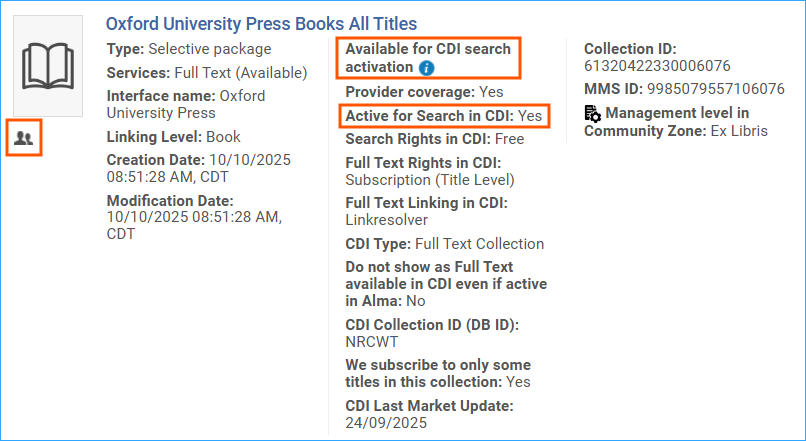
We subscribe to only some titles in the collection setting
- If set to Yes, CDI will match its content to the active portfolios in the collection. If set to No, CDI will set all content of this collection to full text available without matching on individual portfolios. (See the settings according to collection link type below.)
- General use of this setting: Select Yes, to indicate a selective subscription where you subscribe to only part of the content. Select No, to indicate you subscribe to the entire content in the subscription.
- Recommended settings by collection link type:
- Link in Record – Select No for collections that do not have portfolios, then the whole collection will be flagged as full-text available. When set to Yes, only active portfolios will display as full-text available.
- Linkresolver – Ex Libris recommends selecting Yes, especially in cases where not all portfolios are active.
- Hybrid – Ex Libris recommends selecting No.
Ex Libris has set the default for Link in Record type collections to No and Link Resolver type collections to Yes, so in general you should not have to change this setting.
CDI-only full text activation
- If set to yes, the collection is added to the CDI Zero title holdings file. If it is a full-text database in CDI, all records in the collection are flagged as full-text available. The full-text flag is inherited at the collection level, and if portfolio settings exist they will be ignored.
- If the collection is defined as an A&I database in CDI, its content will be searchable in CDI. Do not show as Full Text available in CDI even if active in Alma.
- This option will prevent content from certain collections from appearing in Primo results where you would like to have only the full text active for the link resolver, but not from CDI. For example, duplicate ebook results or Open Access links.
Related Trainings:
Activating an Electronic Resource from the Community Zone in Alma