Managing Items Created "On the Fly"
(12/12/2025)
What is an On the Fly record?
An on the fly (OTF) record is a temporary, brief record created by circulation staff to allow an item to be checked out to a patron immediately, before it has received a full cataloging record. The system creates a system block, “Item was created on the fly (OTF)” which notifies staff when the item is returned that the item has an OTF record.
On the Fly Records are Discouraged
OTF records pose problems for libraries and patrons because they may not be returned properly and remain checked out to patrons after being returned, or they are not processed by staff to remove the OTF block.
Polaris prompts library staff to create OTF records
One problem is that library staff are prompted to create OTF records if an item barcode is mis-scanned during checkout. ODIN has adjusted the wording in the pop-up box urging staff after a mis-scan to try scanning again rather than creating an OTF record.
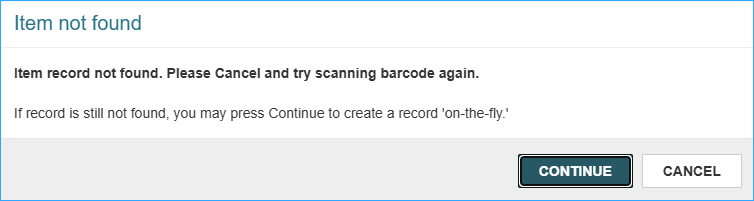
OTF records should not be created for materials that are fully cataloged. These materials are difficult to check in because they contain the mis-scanned barcode in the item record. As a result, patrons may receive overdue notifications for items they have returned.
How to Manage Returned OTF Materials
When an OTF item is checked in, this pop-up message appears:
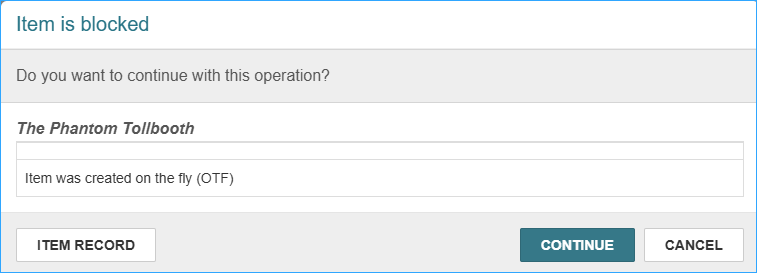
Click continue to close the block and complete the check in. The item should then be cataloged with a full record, and the temporary item record and brief bib record can be deleted.
However, if the barcode is incorrect in the OTF record, the item will not be checked in correctly. Staff will see the comment on the check in screen that the “Item was not Loaned.” A staff member may not notice this common message.
Run a Report
To find OTF records in your library you can run a report. Under the Items tab in SimplyReports there is a filter for System block: Item was created on the fly (OTF). Here are suggestions for the report:
Columns for output
Item call number (select this for sort)
Item barcode
Item creation date
MARC title
Patron barcode
Patron full name
Item circ status
Filters
Branch
Record status: Final
Item block, note, and funding filters
System block : Item was created on the fly (OTF)
You may also consider adding check out date, due date, collection name, or others.
This is what the report looks like (the barcodes are blocked out):
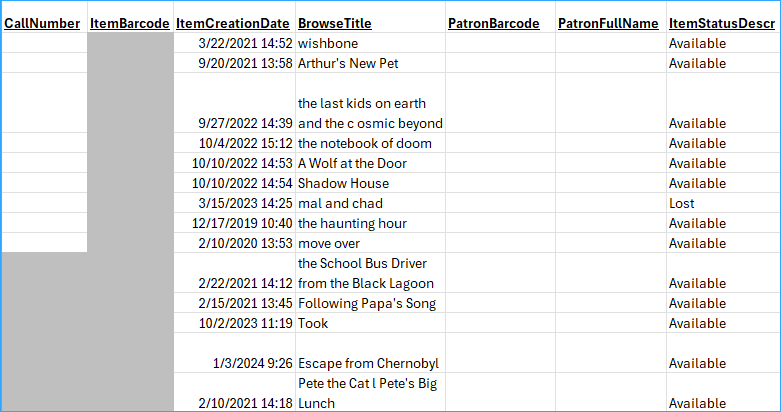
Check your shelves for items on the report. When you find them, catalog them with a full record (if they aren’t already cataloged) and delete the OTF item and brief bibliographic record.
If you would like the OTF report to be scheduled for your library contact the ODIN Office.
Related Trainings: