Cataloging FAQ for Polaris
10/27/2025
I know how to catalog, but I’m new to the ODIN consortium. What local practices are in place in this consortium?
Review the Guidelines for Shared Bibliographic Records in Polaris.
When editing bibliographic records, you may add information to improve the record. You may not remove information that your library doesn’t want, but other ODIN libraries may find useful. If you’re not sure, reach out to the ODIN office to ask questions about what is acceptable.
An example of an exception to the guidelines for editing shared bibliographic records is the North Dakota Vision Services/SB Vision Resource Center, which modified a regular print bib record to Braille format because a Braille bib record was not available. This library has special permission to use these regular print bib records and tailor them to their books by adding special notes about Braille. Otherwise, altering bibs in this way is frowned upon in the shared bib environment of ODIN.
Deleting fields from bibliographic records-
As stated above, do not delete any information from bibliographic records that may be useful for other ODIN libraries. If the field does not display in the PAC and you don’t know what it is for, leave it in the record. Because ODIN has set up configurations and maintenance practices, deleting fields is typically unnecessary.
- Display settings in the PAC have been adjusted to hide unwanted fields.
- Unwanted fields are automatically removed from records when they are imported with an import profile. At this point, fields are not automatically deleted when brought in through the Find Tool in Leap, but we hope this will be the case soon.
- ODIN routinely deletes the following fields from bibliographic records: 029, 263, 938, 948, and 003(OCoLC).
- Foreign language fields - these do not appear in PAC, and it is not necessary to delete them. However, you may delete them if you wish.
- 936 Batchload - This field is usually from Ingram, does not appear in the PAC, and it is not necessary to delete it. However, you may delete it if you wish.
Should I use the record already in Polaris, or bring in a new one?
Use the record already in Polaris.
If you find that OCLC WorldCat has a fuller record, you can overlay the existing record in Polaris (if the OCLC numbers are a match) or copy the notes or subjects from the OCLC WorldCat record into the Polaris record. Do not add duplicate records to the ODIN Polaris database.
If you are unsure whether a record in Polaris is a match for your item, refer to the “When to Input a New Record” (opens in new window) document from OCLC. It has lots of great information on how to determine when a new record is needed.
When is it acceptable to merge two distinct bibliographic records into one?
- When they have the same OCLC number (be cautious not to merge Braille records with regular print records.)
- If the record does not have an OCLC number, when they have the same ISBN number.
- If everything matches between the 2 bibs, but there is no OCLC number or ISBN available for an easy, definitive confirmation, it might still be ok to merge if all the details of the book match.
When not to merge-
- When the OCLC numbers are different.
- Different editions (1st edition vs. 2nd edition)
- Different formats (large print vs. regular print)
- When in doubt, don't merge.
Can I overlay another library’s on-order brief bib if it is from a different vendor? I’m concerned about screwing up the EDI process.
- You can overlay another library's on-order brief bibliographic record when the ISBN matches.
- Overlaying the on-order record will move the on-order item record to the overlayed record.
- You can overlay another library's on-order record with a full bibliographic record when the ISBNs or UPCs match.
- Note: For EDI (Electronic Data Interchange) materials, the 970 tag of the bibliographic record is used to create each segment of the purchase order. ODIN has configured the 970 tag to be retained during overlay, preserving this information.
When I overlay another bibliographic record, the resulting record has a new 035 (OCoLC) field with an incorrect number in it.
This happens when the record to be overlaid has a 003 OCoLC in it. The overlay process combines the code from the 003 field and the control number from the record being overlaid. The result is two 035 fields with a prefix of (OCoLC). The second one is the bad number.
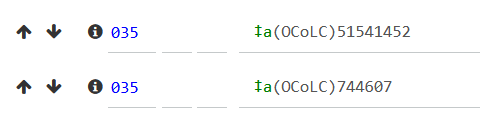
Recommended practice is to delete the (OCoLC) information from the new 035 field (the second one), leaving the control number from the overlaid record.
How do I find the correct Dewey Decimal Call Number when the bibliographic record doesn’t have it?
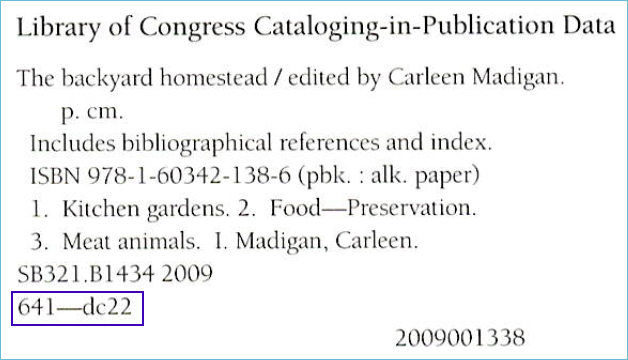
- Check the back of the title page for the CIP (Cataloging in Publication) information. It may be there, but the Library of Congress announced in July 2025 (opens in new window) that Dewey numbers will only be assigned to titles where they are most impactful.
- Search all libraries the ODIN PAC (opens in new window), and see what other libraries have assigned for the book.
- Check FirstSearch (WorldCat) for suggested call numbers. You can access this from the State Library’s Online Resources webpage or the A to Z Databases List on the ODIN website (these links open in new window).
- You can build or confirm Dewey Call Numbers with this tool from LibraryThing (opens in new window).
- Dewey Decimal Summaries are available from OCLC (opens in new window).
I can’t find a record that matches my item. What are the steps I should take to create a bib record?
Follow the directions on the ODIN website for creating a bib record from a template.
I’d like to use a MARC record as a model to create a new MARC record in Polaris. Which records are the best to use as a model?
- Open a bibliographic template with the same resource type (add info about what the resource types are, and how to find the bib templates) for the item you are creating a record for.
- For information to add to the record, you can find similar records…
- Look for records that were created by the Library of Congress. They have “DLC” in the 040 tag.

- Don’t use records created by vendors, such as OverDrive eBook records. Often, these are incomplete and do not use authorized headings for names and subjects.
- You can also find information about MARC tags, including examples, in Bibliographic Formats and Standards (opens in new window).
My book/audiobook/DVD doesn’t have a cover image. What can I do?
The cover image comes from Syndetics and matches the ISBN or UPC in the MARC record. If your MARC record is missing an ISBN, for example, you can add it to the record.
You can also move the best ISBN to the top of the record, and that will be the one that links to the cover image.
Alternatively, if the MARC record does have an ISBN, and you can find the cover image online, you can email syndetics.corrections@proquest.com.
Include 1) a link to the item in the PAC; 2) the desired cover image (copied from Amazon, publisher, or sometimes there is a link to artwork in the record itself); and 3) the item’s corresponding standard number, ISBN, or UPC.
Syndetics usually replies right away, and the image will appear around a week later.
RELATED: